
Guide
Laptop cable locks, and how to lock a MacBook with no lock slot
A laptop cable lock ties your laptop to something heavy through a small slot in its side. Current MacBook Air and MacBook Pro models have no such slot, so you need an adapter, a stick-on bracket, a clip or a locking stand. Each one slows down a grab. None of them makes a sound when someone tries.
· Facts and prices checked 30 October 2026
What this covers
How does a laptop cable lock work?
It has three parts: a steel cable with a loop at one end, a lock head at the other, and a slot in the laptop. You wrap the loop around something that cannot be lifted, then push the lock head into the slot. Kensington, whose slot has been the standard since 1992, says its T-bar head turns so that it locks behind the laptop's internal frame.
The idea is not to make theft impossible. It is to make a two second grab into a job that needs a tool and time, in a room full of people.
Which lock fits which slot?
There are three common slots, and Kensington is plain about it: standard, Nano and Wedge locks are not interchangeable. Check your laptop's manual or spec page before you buy.
| Slot | Usually found on | Lock that fits |
|---|---|---|
| Standard (K-Slot) | Older and larger laptops; Dell gives it as 1/4 by 1/8 inch | Kensington-style T-bar lock |
| Nano | Thin laptops from HP, Lenovo and ASUS; about 70% smaller than standard | Nano lock, such as Kensington NanoSaver |
| Wedge (Noble) | Most Dell laptops; Lenovo gives it as 3.2 by 4.5 mm | Lock labelled Wedge or N17 |
Not sure which you have? The Kensington Universal 3-in-1 Combination Laptop Lock fits all three. It lists at $29.99 on kensington.com.
How do you use a laptop cable lock?
- Find the slot. It is on a side or the back, often next to a small padlock symbol.
- Pick an anchor that cannot be lifted: a desk frame, a fixed table leg or a bolted rail. A table you can raise at one end is not an anchor, because the loop slides off the bottom.
- Wrap the cable around the anchor and pass the lock head through the loop.
- Push the head into the slot, then turn the key or set your code.
- Tug the cable. If the head wobbles or pulls out, take it off and fit it again.
Never force a lock out without the key or code. Targus warns in its own guide that doing so will physically damage the laptop.
Does a MacBook have a lock slot?
Older ones did. Apple's spec pages for the 13 and 15 inch MacBook Pro, Mid 2012, both list a “Kensington lock slot”. The Retina MacBook Pros, the 2016 and later models and every MacBook Air we checked list none.
Today's spec pages list Thunderbolt ports, MagSafe 3, a headphone jack and, on the Pro, an SD card slot and HDMI. No lock slot. Lock makers say the same thing: Compulocks' 2026 Apple catalog opens its MacBook section by noting that MacBook Pro and Air models “lack built-in security slots”.
How do you lock a MacBook with no lock slot?
There are four ways, and they differ mostly in how they hold on to the Mac.
| Option | How it holds the Mac | Fits |
|---|---|---|
| Compulocks Ledge | A small adapter fixed with screws at the Mac's own screw points, giving you a standard slot | Air 13 and 15 inch (M2 to M4), Pro 14 inch (M1 to M5), Pro 16 inch (M1 to M4) |
| Compulocks Blade | A bracket stuck to the Mac with industrial adhesive | Any MacBook |
| Targus HyperShield | Attaches to the air vent, with no tools, glue or screws | 14 and 16 inch Apple silicon MacBook Pro only |
| Kensington Laptop Locking Station 2.0 | A stand with adjustable arms that hold the laptop; $59.99 | Thin laptops from 11 to 15.6 inches |
The Ledge models in Compulocks' catalog stop at M4 for the Air and M5 for the 14 inch Pro, so check the newest models on the maker's page. Compulocks and Targus prices vary by model and country, so we have left them out rather than print a number we could not confirm.
Kensington says its stand needs no changes to the laptop, which keeps your warranty intact. A screw-on adapter means opening a screw on your Mac, and Compulocks says nothing about the warranty on the pages we could read.
Are stick-on lock plates safe for a MacBook?
They hold well because the glue is strong, and that is the catch. Kensington described the adhesive on its own, now discontinued, slot adapter kit as “industrial strength permanent”. Compulocks sells a separate tool for removing its plates.
We found no maker statement about what happens to an aluminium finish when a plate comes off. If you plan to sell or trade in the Mac later, a stand or a clip leaves nothing behind.
How strong is a cable lock, really?
Kensington publishes pull strengths, not cutting results. Its own table gives a standard laptop cable as 4.4 mm thick with a minimum strength of 1,000 lb, and its Ultra cable as 8 to 10 mm and 1,500 lb. It says the Ultra cable is 60% stronger than standard.
None of the makers we checked publishes a test against bolt cutters. In 2019 the lock picker known as LockPickingLawyer showed a Kensington laptop lock coming off without picking it, according to Vice. Treat any cable lock as a deterrent, not a safe.
What a cable lock does not do
 It does not stop a thief with cutters, a pick, or the patience to prise off a plate.
- It does not protect the Mac while it is unlocked, which is most of the time you pack up or move tables.
- It does not tell you anything. If someone is working on the cable while you are at the counter, you will not hear it.
- It does not help after the Mac is gone. That is the job of Find My and Activation Lock, which Apple says is designed to stop others using a lost or stolen Mac. Remote lock and erase only work while the Mac is on and online.
For the habits that matter more than any lock, such as where you sit and what to do before you step away, see our guide on how to stop someone stealing your MacBook in a cafe.
Adding noise: what we measured with Deskwatch
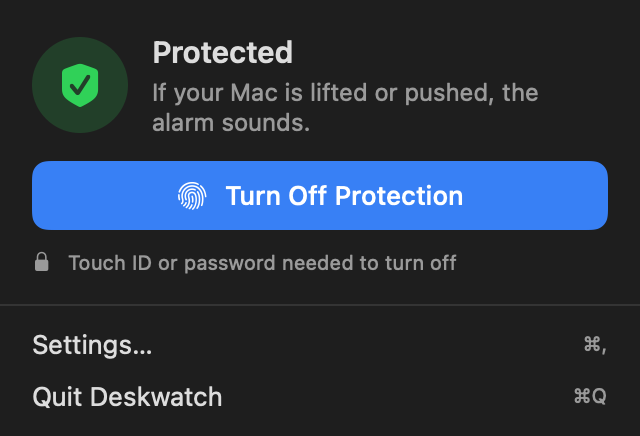
Deskwatch is the app this site sells, so read this section with that in mind. It does the one thing a cable cannot: it makes the Mac loud the moment it moves. It uses the motion sensor already inside Apple silicon MacBooks, so there is nothing to stick on.
In our own tests on a MacBook Air M2 at the default setting:
- Every lift set it off in under a second, usually about half a second after the first touch.
- Typing, knocks on the table and things dropped on it did not set it off.
- A brisk push across the desk set it off. A slow slide, under about 15 cm a second, did not. That is a limit of any motion sensor.
When it goes off, a siren plays at full volume and the screen locks, and only your Touch ID or password stops it. It costs $4.99 once. Use it with a lock if you have one, not instead of one; the lock buys time and the alarm makes sure everyone notices. See how it works or the common questions.
Questions people ask
How do you use a laptop cable lock?
Loop the cable around something that cannot be lifted, such as a desk frame, pass the lock through the loop, then push the lock head into the laptop's lock slot and turn the key or set the code. Tug the cable to check it holds.
Do MacBooks have a Kensington lock slot?
Not any more. Apple's spec pages list a Kensington lock slot on older non-Retina MacBook Pros, such as the Mid 2012 models. The ports lists for the current MacBook Air and MacBook Pro show no lock slot.
How do I lock a MacBook Air or MacBook Pro without a lock slot?
Add a slot or hold the Mac another way: a screw-on adapter such as the Compulocks Ledge, a stick-on bracket such as the Compulocks Blade, the Targus HyperShield that attaches to the vent of a 14 or 16 inch MacBook Pro, or a locking stand such as the Kensington Laptop Locking Station 2.0.
Can a laptop cable lock be cut?
Yes, with the right tool and a little time. Makers sell thicker cables as more cut resistant, but none we found publishes a cutting test. A cable lock stops a quick grab, not a prepared thief.
Which laptop lock fits my laptop: Kensington, Nano or Wedge?
It depends on the slot. The three are not interchangeable, so check your laptop's manual or spec page first. If you are not sure, a universal lock such as the Kensington Universal 3-in-1 fits all three.
Is Find My enough to protect a stolen MacBook?
Find My and Activation Lock make a stolen Mac much less useful to a thief, and you can lock or erase it remotely, but only while it is on and online. They help after the theft. They do not stop it happening.
Sources
Checked 30 October 2026: Apple tech specs for the MacBook Pro (Mid 2012), later MacBook Pro and Air models, and the current MacBook Air and Pro; Apple Support on Activation Lock and Find My; Kensington product pages, slot guides and its pull strength article; the Compulocks 2026 Apple catalog and Maclocks Ledge install sheet; Targus product pages and lock user guide; Dell and Lenovo support pages on slot sizes. Prices are list prices in US dollars on the maker's own site.