
Guide
What to do if your MacBook is stolen: a step by step checklist
Do four things first: turn on Lost Mode in Find My, change your Apple Account password, report the theft to the police with your serial number, and leave the Mac in Find My so Activation Lock stays on. Don't chase the thief yourself. Everything else can wait an hour.
· Checked against Apple's own support pages on 30 October 2026
The checklist
In the first hour
- Stay safe. Don't try to get it back yourself, even if Find My shows where it is.
- Open Find My on another Apple device, or sign in at icloud.com/find. Select your Mac to see where it is.
- Turn on Lost Mode (on the website the button is Mark As Lost). Add a phone number and a short message.
- Change your Apple Account password.
- Report it to the police. Have your serial number ready.
On the first day
- Change the passwords you used on the Mac, starting with your email, then banking and shopping.
- Call your bank if you saved cards in the browser. Lost Mode already pauses Apple Pay.
- Remove the Mac from your trusted devices list, but not from Find My.
- Tell your employer or school if the Mac or its data belongs to them.
- Call your home or renters insurer, and give them the police report number.
In the first week
- If you don't expect it back, erase it from Find My, and still leave it in Find My.
- Watch your accounts for strange sign-ins and charges.
- Set up your new Mac from your Time Machine or iCloud backup.
Can Find My find a stolen MacBook?
Only if Find My was turned on before it was stolen. Apple is clear that Find My Mac is “the only Apple service that can help track or locate a lost Mac”. There is no other Apple service, and Apple can't look it up for you.
Open the Find My app on your iPhone or iPad, or sign in at icloud.com/find, and pick your Mac. You see its approximate location on a map. If it is close by, Play Sound helps you find it. If it is somewhere you don't know, give the location to the police rather than going there.
What does Lost Mode do on a Mac?
Lost Mode locks the Mac and shows your message on its screen. In practice:
 A Mac with Apple silicon is locked with your Apple Account password. An older Intel Mac asks you to make a number passcode instead.
- Your phone number and message show on the lock screen, but only once the Mac is online.
- Apple Pay and other payment cards on the Mac are paused.
- You can only unlock it on the Mac itself, not from the website or another device.
The catch: Apple says the Mac must be “powered on and connected to the internet” to be locked or erased. If the thief keeps it closed or offline, the lock waits until it connects.
Should you erase your stolen MacBook?
Erase it once you no longer expect to get it back. Erasing deletes your data, so nobody can read it. It also means you can no longer see the Mac in Find My, so don't do it while the police are still using the location.
If the Mac is offline, the erase starts the next time it connects. And Apple notes that after an erase, “Activation Lock remains on to protect your device”, which is what stops the thief from setting it up as their own.
Should you remove the Mac from your Apple Account?
This is where people go wrong, because Apple uses two different lists. Keep them apart:
| List | What to do | Why |
|---|---|---|
| Trusted devices (Apple Account) | Remove the Mac | It can no longer receive your sign-in codes. Apple's own checklist includes this step. |
| Find My devices | Leave the Mac there | Removing it turns off Activation Lock, which makes the Mac easier to erase and resell. |
Activation Lock works on Macs with Apple silicon or a T2 security chip, with two-factor authentication on. Apple says it “helps keep your Mac secure, even if your Mac is lost or stolen”. Taking the Mac out of Find My throws that away.
How do you find the serial number without the Mac?
The police will probably ask for it. You have three places to look:
- account.apple.com: sign in, open Devices and click your Mac. This works if the Mac was signed in to your Apple Account.
- The barcode label on the original box.
- Your receipt or order confirmation email.
Which passwords should you change?
Your Apple Account first, because it guards iCloud, Messages and Find My. Then anything you used on the Mac: email, banking, shopping and social media, in that order. Your email comes before the rest because it can reset all the others.
FileVault makes this less frightening. On Macs with Apple silicon or a T2 chip, Apple says your data is encrypted automatically, so a thief can't read the drive without your login password. A Mac that was taken while open and unlocked is a different story, which is why the passwords still matter.
Does AppleCare cover a stolen MacBook?
No. Apple's AppleCare page offers a replacement “if your iPhone, iPad, or Apple Watch is lost or stolen”, and AppleCare One covers those three for theft and loss. The Mac is not on that list. AppleCare+ for Mac covers repairs, including accidents, but not theft.
Your home or renters insurance is the usual place a stolen laptop gets paid for.
Laptop stolen from a car: does insurance cover it?
Usually not your car insurance. The Texas Department of Insurance answers the question directly: “Your auto policy won't.” It adds that a homeowners or renters policy might pay. Rules and limits vary by policy and state, so read yours and ask the insurer.
Police departments give the same advice to prevent it: never leave a laptop, or even an empty laptop bag, visible in a parked car.
Is there a stolen MacBook database?
Not one we could find from Apple. Pages that promise a “stolen MacBook serial lookup” are not run by Apple. Apple's Check Coverage page takes a serial number but only shows warranty and AppleCare status, so a stolen Mac still looks normal there.
If you are buying a used Mac, ask the seller to sign out of Find My in front of you. A Mac that asks for someone else's Apple Account when you set it up is still locked to them.
How to stop it happening again
Most laptop theft is a two second grab while the owner is at the counter or in the toilet. Our guide on stopping MacBook theft in a cafe covers where to sit and what to do before you step away, and our guide to locking a MacBook that has no lock slot covers cable locks.
Deskwatch is the app this site sells, so read this with that in mind. It turns the motion sensor in your MacBook into an alarm. If someone lifts or shoves the Mac, or closes its lid, while protection is on, a siren plays at full volume and the screen locks, and only your Touch ID or password stops it. In our tests every lift set it off in under a second.
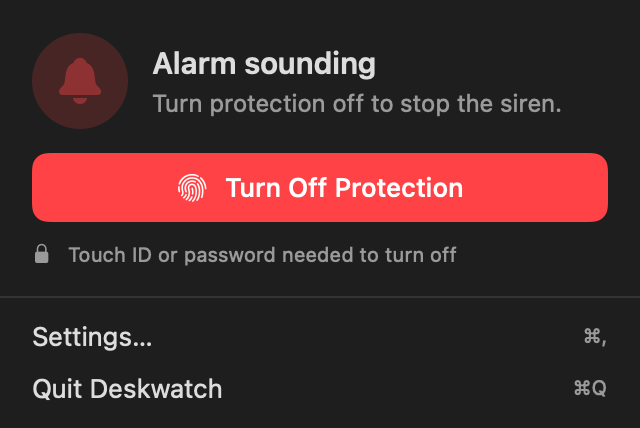
What it can't do matters just as much: it can't find a Mac that is already gone, and it can't stop someone willing to run off with a screaming laptop. It makes the grab loud, which is usually enough to stop it. It costs $4.99 once. See how it works.
Questions people ask
Can Apple track or unlock a stolen Mac for me?
No. Apple says Find My Mac is the only Apple service that can help track or locate a lost Mac. If Find My was off, Apple cannot find it for you. Change your passwords and report it to the police.
Can the thief use my Mac after I erase it?
Not easily, as long as you leave it in Find My. Apple says Activation Lock stays on after a remote erase, so the Mac still asks for your Apple Account. It works on Macs with Apple silicon or a T2 chip.
Does Find My work if the stolen Mac is off or offline?
You may still see its last location. Lost Mode and erase wait until the Mac is on and connected to the internet, then take effect.
Does AppleCare+ cover a stolen MacBook?
No. Apple's AppleCare page lists theft and loss cover for iPhone, iPad and Apple Watch only, including on AppleCare One. AppleCare+ for Mac covers repairs, not theft.
Is a laptop stolen from my car covered by car insurance?
Usually not. The Texas Department of Insurance puts it plainly: your auto policy will not pay, but a homeowners or renters policy might. Check your own policy.
Can I check whether a used MacBook is stolen?
We found no public Apple tool for that. Apple's Check Coverage page only shows warranty status. Ask the seller to sign out of Find My in front of you, and walk away from any Mac that asks for someone else's Apple Account.
Sources
Checked 30 October 2026: Apple Support, “If your Mac is lost or stolen”, “Use Lost Mode in Find Devices on iCloud.com”, the Find My erase guide, “Activation Lock for Mac”, “Find your Mac model name and serial number”, the FileVault guide and the Apple Pay lost device article; apple.com/applecare; Texas Department of Insurance auto insurance FAQ; Healdsburg Police and Delaware State Police vehicle break-in advice.