Guide
The best anti-theft software for a MacBook
Start with Apple's free tools: Find My, Activation Lock and FileVault. They help after a theft. To stop the grab itself, add an alarm app that makes noise when someone moves your Mac. We sell one of those, Deskwatch, so we list the others fairly. Add a tracking app only if you want more than Find My gives you.
· Prices checked on each maker's site on 3 November 2026
Two different jobs
Most “best anti-theft software” lists mix up two things. Some software helps you get a Mac back or protect what is on it after it has gone. Other software tries to stop it going in the first place. You probably want one of each.
| Software | What it does | Price |
|---|---|---|
| Find My and Activation Lock | Locate, lock and erase; blocks reuse | Free |
| Deskwatch (ours) | Siren and screen lock on lift, shove or lid close | $4.99 once |
| MacGuard | Siren on movement, lid, wake or touch; iPhone alerts | $9.99 |
| Unplug Alarm | Siren on unplug or lid close | Free download; $11.99 a year or $19.99 for life |
| ProxiOne | Siren on unplug, lid or wake; Bluetooth lock | Free for 3 days, then $6.99 |
| Don't Touch | Siren on touch, lid, charger or camera movement | $5 once |
| Prey | Location, remote lock and alarm | From $2.99 a month |
| Hidden | Location, photos, lock and wipe | From $1.67 a month, billed yearly |
| Absolute Home & Office | Location and lock; recovery team on Standard | Free first year; paid from $19.99 a year |
| Do Not Disturb | Alerts you when the lid opens; no siren | Free |
We have not tested the other apps. Their details come from their own pages, and we give our own test results only for Deskwatch.
Start here: what Apple gives you for free
 Find My shows where your Mac is, and can lock or erase it. Apple calls it “the only Apple service that can help track or locate a lost Mac”. Lock and erase need the Mac on and online.
- Activation Lock stops anyone else setting up your Mac, even after it is erased. It works on Macs with Apple silicon or a T2 chip.
- FileVault protects your files. On Macs with Apple silicon or a T2 chip, Apple says your data is encrypted automatically.
Check today that Find My is on, because it can't be turned on after the theft. None of these makes a sound when someone picks up your Mac. Our guide to tracking a stolen laptop covers what they can and can't do.
Alarm apps: to stop the grab
A thief wants nobody to look. A siren takes that away. These apps differ mostly in what sets them off, and that matters: a thief who lifts a Mac off a table without touching the charger or the lid won't trip an app that only watches those.
- MacGuard: made for Apple silicon MacBooks on macOS 14 or later. Goes off if someone moves the Mac, opens the lid, wakes it or touches the keyboard or trackpad. A companion app sends alerts to your iPhone.
- Unplug Alarm: goes off when the Mac is unplugged or its screen is closed, even when muted. Needs macOS 12 or later. It lists no motion trigger.
- ProxiOne: its Café Mode sounds an alarm if someone unplugs the charger, closes the lid or wakes the screen, and it can lock the Mac when your phone leaves Bluetooth range. Needs macOS 13 or later and an iPhone.
- Don't Touch: goes off on touch, lid, charger or sleep. Its maker says modern Macs have no accelerometer API, so it uses the camera to notice movement.
- Open source: laptop-alarm, lidguard and dont-touch-my-laptop are free on GitHub. They are one-person projects and some need Terminal, so they suit people comfortable with that.
Deskwatch: what it does, and what it doesn't
Deskwatch is ours, so read this with that in mind. It watches the motion sensor inside Apple silicon MacBooks. If someone lifts or shoves the Mac, or closes the lid, while protection is on, a siren plays at full volume and the screen locks, and only your Touch ID or password stops it. It costs $4.99 once, has no account, and its motion readings never leave the Mac.
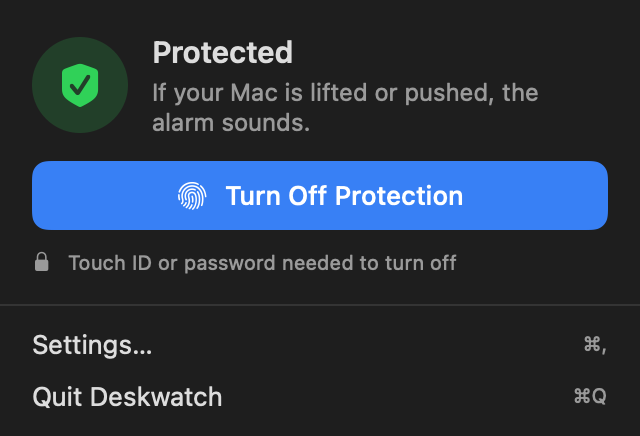
In our own tests on a MacBook Air M2, at the default setting:
- Every lift set it off in under a second.
- Typing, knocks on the table and things dropped on it did not.
- A slow slide, under about 15 cm a second, did not set it off. That is a limit of the sensor.
The limits you should know before buying:
- It only runs on Apple silicon MacBooks with macOS 15 or later.
- It only works once you turn protection on, or set it to turn on when you lock your Mac.
- It reads the sensor through undocumented access, so a macOS update could break it until we update the app.
- It can't find a Mac that has gone. Keep Find My on as well.
Tracking apps: to get it back
These add to what Find My does. Every one has to be installed before the theft, and the Mac has to get online to report anything.
- Prey: location, screen lock, remote alarm and alert messages on macOS, Windows, Ubuntu, Chromebooks and Android. Prey Starter is $2.99 a month for 5 devices. Useful if you have several devices on mixed systems.
- Hidden: location, photos of whoever has the Mac, screenshots, remote lock and wipe. Basic is $1.67 a month for 1 device, billed yearly, with a 7-day free trial.
- Absolute Home & Office, formerly LoJack for Laptops: supports macOS 13, 14 and 15 according to its FAQ. Standard adds investigators who work with the police. Its best feature, surviving a reset, doesn't apply to Macs: Absolute says “Apple has not opened up their firmware”.
We could not confirm Apple silicon support on the pages we could read for these three, so ask before paying if you have a newer Mac.
Old names still on “best of” lists
Several lists still recommend products that have gone or changed. Before you search for one of these:
- Undercover: its maker told customers support would stop on 1 January 2020, and orbicule.com now shows a domain for sale.
- LoJack for Laptops: renamed Absolute Home & Office.
- GadgetTrak: its website no longer loads for us, and we found no recent coverage.
- Find My Device on Windows or Android: useful, but it won't protect a Mac.
Which one should you pick?
| If you want to | Use |
|---|---|
| Find, lock or erase a stolen Mac | Find My, free, and turn it on now |
| Stop a grab in a cafe or library | An alarm app that notices movement, such as Deskwatch or MacGuard |
| Try an alarm for free | Unplug Alarm, a free download that covers charger and lid; check what the free version includes |
| Get photos of whoever has it | Hidden |
| Cover several devices on mixed systems | Prey |
| Know if someone opened your lid | Do Not Disturb from Objective-See |
| Protect your files | FileVault, which no app replaces |
Software is one layer. Where you sit matters too, as our guide on stopping MacBook theft in a cafe explains, and a cable lock made for a MacBook buys extra time. If it is already too late, use our stolen MacBook checklist.
Questions people ask
Does a MacBook have a built-in theft alarm?
We found no alarm feature in Apple's guides to Find My, Activation Lock or FileVault. Those tools help you lock, erase or find a Mac afterwards. To make noise when someone grabs it, you need an app.
Can an alarm app find a stolen MacBook?
Most can't, and Deskwatch doesn't. An alarm works in the moment of the grab. To find a Mac afterwards you need Find My, or a tracking app such as Prey or Hidden.
Is Prey free for a Mac?
Prey's current pricing page lists no free plan. Prey Starter costs $2.99 a month for 5 devices. An older help page still mentions free use, so check when you sign up.
Do LoJack for Laptops and Undercover still work?
LoJack for Laptops is now called Absolute Home & Office. Undercover shut down: its maker told customers support would stop on 1 January 2020, and its old website is now a domain for sale.
Do motion alarms work on Apple silicon Macs?
Some do, including Deskwatch and MacGuard. Apple offers no public way to read the motion sensor, so these apps rely on undocumented access, and a macOS update could break it until the app is updated. Lid and charger triggers don't have that problem.
Will an alarm stop a thief who powers off the Mac?
Holding down the power button stops any software alarm, because nothing is left running. That takes several seconds of standing there next to a siren, which is usually not what a thief wants.
Sources
Checked 3 November 2026: Apple Support on Find My, Activation Lock and FileVault; Mac App Store listings for MacGuard, Unplug Alarm and ProxiOne; donttouch.theill.com; preyproject.com pricing and individuals pages; hiddenapp.com pricing; Absolute Home & Office plans and FAQ; objective-see.org; GitHub project pages. Undercover's end date comes from copies of its maker's email to customers, since its own site has gone. Prices are in US dollars and can change.