
Guide
Does AppleCare cover theft?
Yes for an iPhone, iPad or Apple Watch, if you have AppleCare+ with Theft and Loss or AppleCare One, and Find My was on. You pay a $119 to $149 deductible per claim. No for a Mac: no AppleCare plan replaces a stolen Mac.
· US prices and terms checked against Apple's plan documents on 10 November 2026

What this covers
Which Apple devices does AppleCare cover for theft?
Only three. Apple's AppleCare One disclosure says it plainly: “Theft and Loss coverage is only available for iPhone, iPad, and Apple Watch.” Plain AppleCare+ covers repairs and accidents, not theft, on every device.
| Device | Theft cover? | Deductible per claim |
|---|---|---|
| iPhone | Yes, with Theft and Loss or AppleCare One | $149 |
| iPad | Yes, with Theft and Loss or AppleCare One | $129 |
| Apple Watch | Yes, with Theft and Loss or AppleCare One | $119 |
| Mac | No, on any plan | Not offered |
| AirPods | No, on any plan | Not offered |
| Vision Pro | No, even in AppleCare One | Not offered |
Deductibles are from Apple's US plan disclosure dated 28 October 2026, and tax is added on top.
How much does AppleCare theft cover cost?
There are two ways to get it. AppleCare+ with Theft and Loss covers one device. AppleCare One covers several for one monthly price. These are Apple's US prices for an iPhone:
| iPhone | Monthly | Yearly | 24 months |
|---|---|---|---|
| iPhone 17e, 16e | $10.99 | $109.99 | $219 |
| iPhone 17, 16, 15 | $12.99 | $129.99 | $259 |
| iPhone Air | $14.99 | $149.99 | $299 |
| iPhone 18 Pro, 17 Pro and Pro Max | $14.99 | $149.99 | $299 |
AppleCare One starts at $19.99 a month for up to three products, and $5.99 a month for each extra one. The Family plan is $49.99 a month. Your Mac can be one of the three products, but it gets repair cover only, not theft cover. Some older articles still list the iPhone 17 Pro at $13.99 a month; Apple's current figure is $14.99.
How many theft claims can you make?
 AppleCare+ with Theft and Loss: up to two theft or loss claims every 12 months.
- AppleCare One Individual: three claims a year in total, however many devices you add.
- AppleCare One Family: six claims a year, shared by everyone on the plan.
- Each claim costs the deductible plus tax, and the most Apple pays is the retail price of your device.
What do you need for an AppleCare theft claim?
The rule to get right is Find My. Apple's disclosure says “Find My must be enabled at the time the device is lost or stolen”, and it must stay on until the claim is done.
- Find My on before the theft. You can't switch it on afterwards.
- Share My Location is not the same thing. Apple says it “does not turn on the Find My functionality”.
- Don't remove the device from your Apple Account. Apple says to wait “until your claim has been fully approved.”
- File within 60 days of the theft. Apple's disclosure: “Claims must be filed within 60 days of incident.”
- Have your receipt and photo ID ready. The insurer may also ask for a police report.
If the claim is approved, Apple says the stolen device “will be permanently disabled” and you get a replacement. It can be a different model or colour with similar features, and your cover moves to it.
What doesn't AppleCare theft cover pay for?
Apple's US disclosure lists these exclusions, and says the list isn't complete:
- Handing the device over yourself, even if you were tricked. Apple excludes “voluntary parting with the covered device”, including by fraud.
- Reckless, dishonest or intentional acts.
- Fire, acts of God, and seizure by a government.
- Accessories on their own, such as an Apple Pencil or a watch band.
We didn't find “left unattended” on the list in Apple's disclosure or in the California iPhone certificate from the insurer. A device taken off a cafe table is still a theft. But the certificate for your state is the real contract, so read it if you can.
How do you file an AppleCare theft claim?
- Mark the device as lost in the Find My app or at icloud.com/find. Leave it in Find My.
- Report the theft to the police and keep the case number.
- Start a claim on Apple's Theft and Loss claims page and sign in with your Apple Account, or call 800-275-2273.
- Pay the deductible when the claim is approved, then wait for the replacement.
The theft part of the plan is insurance, underwritten by New Hampshire Insurance Company, and claims go through AIG. To check a claim's status, Apple's claim help page says to contact Assurant or AIG directly.
Can you add theft cover later?
Within 60 days. Apple says that when you buy a new iPhone, iPad or Apple Watch, “within 60 days of purchase, you can add AppleCare+ with Theft and Loss coverage”. That is the US window. Apple's page doesn't say you can add it after that.
Does AppleCare cover a stolen MacBook?
No. Apple's US terms for AppleCare+ for Mac say the plan does not cover anything “to replace Covered Equipment that is lost or stolen”. Adding a Mac to AppleCare One doesn't change that, because its theft cover only applies to iPhone, iPad and Apple Watch.
What AppleCare+ for Mac does cover is repairs: unlimited accidental damage while the plan is active. On most Macs that costs a $99 fee if only the screen or the bottom case is damaged, or $299 for other damage. That helps if you drop it, not if someone walks off with it.
For a stolen Mac, home or renters insurance is the usual route. Apple's own disclosure notes its theft cover “may duplicate other insurance coverage, such as homeowner's or renter's insurance”, so check your policy for a laptop limit and deductible. If your Mac is already gone, start with our checklist for a stolen MacBook. If it isn't, turn on Find My Mac today, so you can at least locate and lock it.
No theft cover for your Mac: where Deskwatch fits
Deskwatch is the app this site sells, so read this with that in mind. Since no AppleCare plan pays out for a stolen Mac, the cheapest protection is stopping the grab. Turn it on before you step away, and if anyone lifts your MacBook or closes the lid, a siren plays at full volume and the screen locks. Only your Touch ID turns it off.
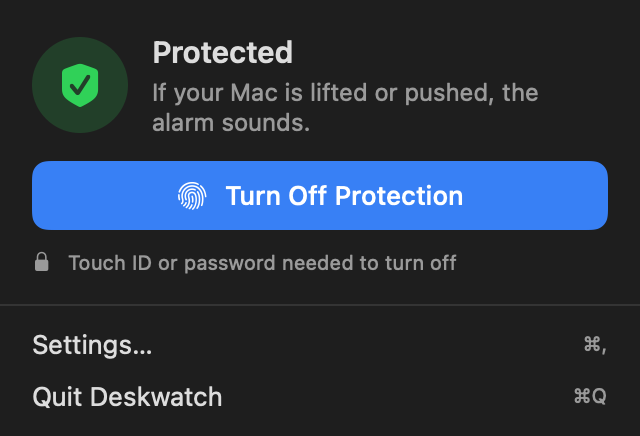
In our tests on a MacBook Air M2 at the default setting, every lift set it off in under a second. A slow slide, under about 15 cm a second, did not. It can't find a Mac once it is gone and it is not insurance. It needs an Apple silicon MacBook on macOS 15 or later and costs $4.99 once. For habits that help too, see how to stop someone stealing your MacBook in a cafe, or compare the best anti-theft software for a MacBook.
Is AppleCare theft cover available outside the US?
In some countries. AppleCare One Individual is offered in Australia, France, Germany, the UK and the US, and the Family plan only in the US. AppleCare+ with Theft and Loss is sold in a wider list of countries, with its own prices and terms in each, so check Apple's AppleCare page for where you live. Everything above is for the US.
Questions people ask
Does AppleCare+ cover a stolen iPhone?
Only AppleCare+ with Theft and Loss or AppleCare One does. Plain AppleCare+ covers repairs, not theft. With theft cover you pay a $149 deductible plus tax per claim, and Find My must have been on when it was stolen.
Does AppleCare cover a lost iPhone?
Yes, with the same plans. Apple's insurer treats a device as lost when it goes missing in an unexplained way and can't be recovered. The same deductible, claim limits and Find My rule apply.
Does AppleCare cover a stolen MacBook?
No. Apple's US plan terms for AppleCare+ for Mac say the plan won't replace a Mac that is lost or stolen. A Mac in AppleCare One doesn't get theft cover either. Check your home or renters insurance instead.
How many theft claims does AppleCare allow?
Two claims every 12 months on a single-device AppleCare+ with Theft and Loss plan. AppleCare One allows three a year on Individual and six on Family, shared across the whole plan.
Do I need a police report for an AppleCare theft claim?
Apple's disclosure doesn't require one up front, but the insurer's certificate says you may be asked for a police report case number or a copy. Get one anyway; it helps with insurance and the police.
Can I add theft cover after I buy my iPhone?
In the US, Apple says you can add AppleCare+ with Theft and Loss within 60 days of buying a new iPhone, iPad or Apple Watch. AppleCare One has the same 60-day window for a device you already own.
Sources
Checked 10 November 2026: Apple's US AppleCare+ with Theft and Loss disclosure, AppleCare One disclosure and terms, and AppleCare+ for Mac terms (all dated 28 October 2026, read from the PDFs); the insurer's California iPhone certificate (July 2025); apple.com/applecare; Apple Support on getting AppleCare coverage, Theft and Loss claims for iPhone, help with a claim, and AppleCare One availability. Web pages were read in a browser. Alarm results are our own tests on a MacBook Air M2 at the default setting.